· One min read

The inorigo® Launcher is Now Available on Microsoft Store

We’re pleased to announce that the inorigo® Launcher is now available for download directly from the Microsoft Store.

This release makes it easier than ever to install, deploy, and maintain the inorigo® Launcher. With the Microsoft Store version, you’ll benefit from:

  • Simplified installation — one click install.
  • Streamlined deployment across your organization.
  • Automatic updates to ensure you’re always running the latest version.

You can find more info about the inorigo® Launcher here

Download inorigo® Launcher on Microsoft Store: inorigo® Launcher - Free download and install on Windows | Microsoft Store

· One min read

inorigo® Platform Update – Version 22.5.3

The latest version of the inorigo® Platform introduces support for Microsoft Graph SendMail API, usability improvements, and key fixes that enhance overall stability.

Highlights
  • Microsoft Graph SendMail API – Send emails directly through Microsoft 365 GraphAPI, enabling smoother integration and automation.
  • KnowledgeSet Builder – The “New” menu file option is now disabled for read-only users, improving permission control.
  • Model Builder – Import/Export now correctly removes deleted attributes, keeping environments consistent.
· One min read

Portal Update – Version 23.4.5

We’ve released Portal v23.4.5, featuring important fixes and performance improvements.


Highlights:
  • Copy Link to Clipboard – Copying links from the file menu now works as expected.
  • Improved Performance – The portal is now faster and more stable, especially in environments with many users.

This update provides a more consistent and reliable experience for all portal users.

If the Portal is installed in your environment, the update will be applied automatically.

You can find the detailed release notes here

· One min read

Data Grid Update – Improved Copy/Paste Handling

This update resolves issues related to copying and pasting values in the Data Grid, improving accuracy and usability.

Highlights
  • Value Set Detection – Pasted values are now correctly recognized, even when generated from presentation expressions.

  • Parentheses Handling – Values containing parentheses (e.g., “Value (Type)”) are now properly identified and matched to existing entries.


If the Data Grid is installed in your environment, the update will be applied automatically.

You can read more about this release here

· One min read

inorigo® Platform 22.5.1 Update

This release introduces Platform Version 22.5.1 along with updates to Rights Manager, Access Manager, Integration File Manager.

Highlights
  • Rights Manager – Manage authorization workflows with rule configuration, group handling, and real-time rule scenario testing.
  • Access Manager – Content managers can grant and control permissions across groups or individual objects.
  • Integration File Manager – Streamlined file handling with upload, download, preview, rename, and delete.
  • LDAP Import – Direct integration with OpenLDAP and Active Directory for simpler user management.
· One min read

Unofficial launch of the inorigo® Resource Hub

We’re excited to announce our version of this site.
Here you’ll find helpful information, guides, and quick-reference materials on how to work with various inorigo® components and tools.

We hope you find the content useful and intuitive — and we’d truly appreciate your input on how we can improve and streamline the information and user experience before the public release.

· One min read

The Integration File Manager is released

The Integration File Manager is a web based tool, accessible from the Workbench. It facilitates access to files within inorigo® and enables uploading, downloading and previewing various file types.


In contains features like:
  • File uploading
  • File down loading
  • Preview mode
  • Easy sync with the Connection Editor


Read more about it here

· One min read

Data Grid Updates

Fixes
  • Paste Match Behavior
  • Missing Column in DataGrid with Nested Units

Compatibility and System Requirements

Minimum inorigo® Version 22.5.1

· One min read

New Data Sources Added

These database addons are available from the Connector if installed.

  • Amazon Redshift
  • Amazon Athena
  • MongoDB
  • MySQL
  • Oracle
  • PostgreSQL

Compatibility

from inorigo® version 22.4.10


Read more about the connection editor here

· One min read

Dependency Graph Addon Released

The Dependency Graph is an addon available in Knowledge Set Builder, Connection Editor, and Data Source Editor. It can be accessed from the Toolbar menu of these respective tools.

Feature Overview

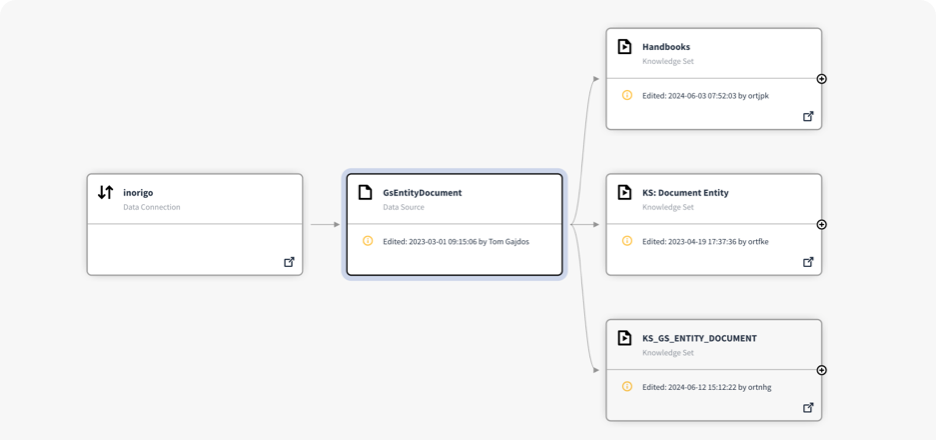
The Dependency Graph visualizes all the knowledge sets, data sources, applications, APIs and data connections that are dependent on the current opened source – and all sources that the current source is using.

You can read more about the Dependency Graph Here


· One min read

Graph QL Improvements

What's new
  • Graph QL handling of Queries
  • Graph QL Improvements for Model Builder
  • Honour Graph QL License Agreement
· One min read

New Improvements for the Data Grid


What's new
  • Column Copy Headers
    The user experience has improved by including the column names when copying data from a Data Grid. By pressing ctrl+shift+C the column headers will be included in the clipboard.
  • Paste Match
    The match row checkbox in the Paste Match dialog is now always enabled (even if no match can be found). Selecting the checkbox will add new rows vs overwrite if not selected.
· One min read

Data Grid Bug fixes & Improvements

Bug Fixes
  • Fixed a bug in the Data Grid, where it did not read the item related via Consist of (nested unit) under certain circumstances e.g. when you want to create a structure with Specific Units. 
  • Creating a new nested unit value will show a never-ending updating value panel under certain circumstances.
  • New nested entity may pick definition from Nesting unit under certain circumstances.
· One min read

Fixes to the inorigo® portal

Highlights
  • Support for link navigation for applications inside Portal 
  • Updated plugin "navigator-portal" for inorigo-platform
  • Bigger text in header
  • Bug fixes